
SD Card – Pros & Cons
An SD (Secure Digital) card is a tiny flash memory card designed for high-capacity memory and various portable devices, such as car navigation systems, cellular phones, e-books, PDAs, smartphones, digital cameras, music players, digital video camcorders, and personal computers. These are the smallest storage devices that are best used for storing files and playing them back.
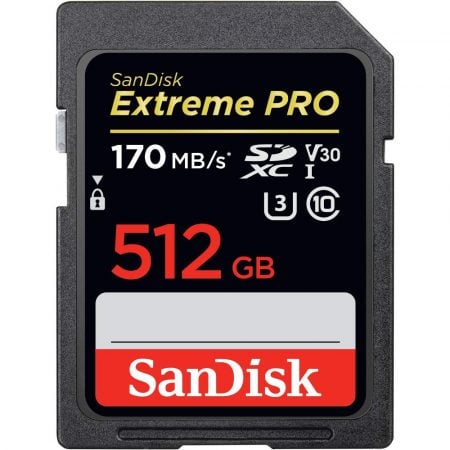
Pros
Here are the positives of having an SD card:
- Portability – SD cards are highly portable. Your camera, tablet, or smartphone all readily accommodate SD cards.
- Speed – If you buy the latest SD card, it will result in your device instantly getting a speed boost.
Cons
Here’s the main drawback of SD cards:
- Risky – If you end up buying a low-end, unbranded SD card, it will result in reduced and sluggish/laggy performance of your device.
Learn how to Recover Lost Data with SanDisk Rescuepro [Step-by-Step]
Solid State Drive (SSD) – Pros & Cons
An SSD (Solid State Drive) is a type of storage device used in computers. They, basically, replace traditional hard disk drives (HDDs) in computers and perform the same basic functions as a hard drive, but are significantly faster in comparison. An SSD has been optimized for running the operating system partition of a computer, which differentiates it from other flash memory types.

Pros
Here are the benefits of having an SSD:
- Speed – Since it uses non-volatile flash memory, the speed of an SSD is noticeably faster than a hard drive.
- Durability – Unlike HDDs, SSDs don’t have moving parts. This makes them significantly more durable.
Cons
Here’s the main drawback of SSDs:
- Price – When it comes to dollars per GB (gigabyte), portable SSDs are much more expensive than HDDs.
Learn more about SSDs:
SD Card vs SSD: Key Differences
Here are the key differences between SD card vs SSD:
#1. Form Factor
Owing to their highly compact size, SD cards fit into a variety of devices, including smartphones, cameras, drones, automobiles, and even computers.
With a significantly larger size and a form factor that emulates a hard drive, SSDs are meant to be used with larger devices like computers and servers.
#2. Use Cases
SD cards support a wide array of data, from 4K video to mobile apps due to their tiny form factor. They usually aid in freeing up internal memory and boosting the device’s speed when users attempt to store and access data, music, and videos. An SD card is not appropriate for heavier read/write use cases, like being the OS drive in a system.
SSDs, on the other hand, are packages of flash memory that connect to the same drive interfaces and respond to the same commands as a hard drive. For all intents and purposes, the OS thinks of it as a disk drive even though the media is Flash. In other words, an SSD is mainly a system device that’s used as the main storage option in a computer.
#3. Storage Sizes
Since SD cards are not meant to be primary storage media, they usually come in tiny storage sizes, ranging from 16GB to 256GB. However, today they have increasingly started coming in higher storage capacities like 512GB and 1TB.
In contrast, the storage capacity of most SSDs ranges from 250GB to 4TB because being the primary storage media in your computer, they have to be smarter and more adaptable.
#4. Speed
The read/write speeds of Class 10, UHS-I SD cards, that are widely used today, range from 50 to 128MB/s. The newer and more advanced UHS-II rated SD cards are faster and can offer read/write speeds up to 300MB/s.
In comparison, even standard SSDs can perform at incredible read/write speeds of up to 500 MB/s. The newer NVME SSDs can even show speeds of up to an astounding 3,000 to 3,500 MB/s.
#5. Lifespan
When it comes to their lifespan, SD cards are restricted to a finite number of write cycles. That’s usually in the range of 3,000 to 5,000. And, since SD cards tend to use cheaper memory modules, they are less reliable than SSD drives.
Talking about SSDs, they also have a limited number of write cycles in each memory block. This number is usually only a few thousand on most drives. However, unless you’re writing tens of gigabytes of data a day, every day for several years, you won’t get close to the limit on write cycles. To sum up, SSDs are a better and more reliable choice for day-to-day storage than SD cards.
#6. Price
We compared the current price (at the time of writing this) of a 500GB variant of popular SD card and an SSD on Amazon. You’ll be surprised to know that the Samsung T7 Portable SSD 500GB which offers up to 1050MB/s speeds is priced lower than the SanDisk Extreme PRO SD Card 512GB having maximum transfer speeds up to 170MB/s.
Check the current price of both as of this day:
SanDisk Extreme PRO 512GB SD Card
No products found.
Samsung T7 Portable SSD 500GB
No products found.
Solid State Drive (SSD) Recommendations
Here are some great SSDs that you can buy in 2022:
#1. Samsung T7 Portable SSD – External SSD
No products found.
#2. Samsung 870 EVO SSD – Internal SSD
No products found.
Read: Full review on Samsung 870 EVO SSD
#3. SanDisk Extreme Pro Portable SSD – Up to 2000MB/s
No products found.
Also read: SSD BATTLE: Sandisk vs Samsung SSD
SD Card Recommendations
Here are some of the best SD cards that you can buy as of today:
#1. SanDisk Extreme Pro – UHS-I SD Card
No products found.
Read: Full review on Sandisk Extreme Pro
#2. Lexar Professional 1066x – UHS-I SD Card
No products found.
#3. Kingston Canvas React Plus – UHS-II SD Card
No products found.
Wrap Up
I hope that, from all the differences explained above, you now have a fair idea of what to expect from an SSD and an SD card, and that both have quite different use cases.
So, buy a good SD card if you want to add up to the storage capacity of your portable devices, like smartphones, digital cameras, music players, etc.
However, if you want to replace traditional hard disk drives (HDDs) in your computer with a faster alternative, then a good SSD is what you should be looking for.
Thanks for reading!
I hope this guide helped you learn about all the key differences between SD card vs SSD.
Sharing is Caring ❤️
If you found this article useful, please share it on social media with your family and friends.


 EN
EN  IT
IT  DE
DE  ES
ES  PT
PT  NL
NL  FR
FR 